F

A

Q

SVG Help

No login or password required, simply scroll down to the bottom of each blog post and click the PINK DOWNLOAD button!

If you are connecting from a third party, like (Facebook, Pinterest, email, etc), the download will not complete.  Open link outside the app, in a new browser window and try to download again. My download buttons are pink! 

The SVG file type might not show up on some WINDOWS PC computers, but I can guarantee it is in there.  It has an internet icon and labeled as a HTML DOC.  This happens because your computer doesn’t have an appropriate program to read the SVG file type. This is fine and it will still work as a SVG file once uploaded to Design Space.
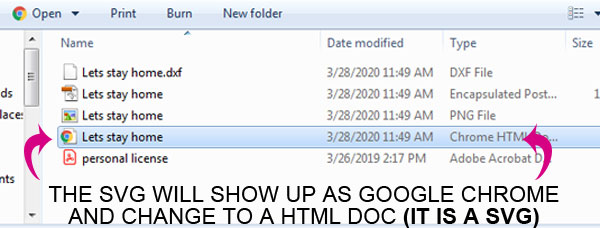
svg file type changed to html

Open up Design Space and click upload > browse > find folder and the SVG file type or it may have an internet/Chrome icon labeled HTML DOC. This is the SVG and will work as one. You must upload it to Design Space to view/open the SVG with layers.  Double-clicking on the file won’t open it.
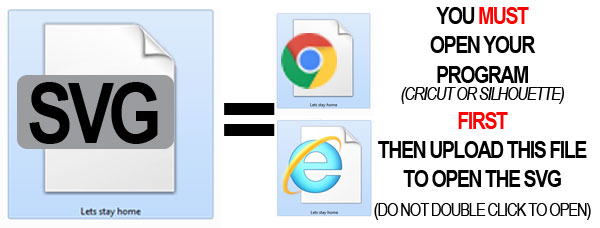
svg file type changed to html

You MUST upload the SVG file type for layers. Ungroup to select each layer. If there is no option to ungroup, then it may be the wrong file.

If you can’t ungroup a design you might have uploaded the PNG file, which is an image(picture). If it asked you what type image is it, and had you clean it up, then you uploaded the PNG which is for print and cut. Select the SVG file type for layers! 

Helpful Videos for using SVG files

use of SVG files

Free SVG files are for personal use only. For yourself, or to make a gift. No sales. However, I do offer single  Commercial License for a small fee.

Find my Commercial License HERE. Please read listing before purchasing. Each download will need its own license.

NO! Absolutely no digital products of any kind!

You can not share your downloaded files with anyone.  You MAY however link them to my post where you downloaded the files. They must download the files themselves from my website.

You may use my free SVG design to make physical items for yourself, or as a gift for some else.  Apply to mugs, shirts, tumblers, key chains, etc.

Full Access membership

Once you complete your subscription, you will get an email to setup your password. Login to your account, on the dashboard click UNLOCKED SHOP. Complete the check out process, no card needed.  After completed, it will display each download link and you can also find it in your DOWNLOADS section. 

Yes! You can sell unlimited physical products with SVG design on it. You must be an active Full Access member.

Under your new dashboard, there will be a button label MOCKUP IMAGES. Click the button and you will taken to the mockup image library.

Every week new SVG files will be added to my SVG shop!

You can cancel anytime, under your account subscription. However, since this is a digital product and you will get access instantly, I can not refund purchase price. 

Yes! You can continue to use my SVG files that you downloaded within the membership for personal use. Once you cancel, your Unlimited Commercial License is VOID after your membership expires. You will no longer be able to use for your small business. 

What if I have a question that is not listed?

Please contact me HERE , and send me a personal email with your DETAILED question.

hello i'm gina

of Gina C. Creates. Here you will find free SVG Cut Files, Cricut craft projects, party printables and home DIY. I hope you enjoy my hand-drawn designs and craft projects.

post category

You Are invited!

To the Cricut Adventure Summit
April 30th-May 3rd, 2026
Craft to 38+ Cricut Workshops, download free templates and learn from the best!

Member login

login icon